Flynn –
Support & Help Centre
About Flynn
Flynn is a GST reconciliation software application that integrates with Xero to automate GST reconciliation for defined reporting periods, including 2-monthly, 6-monthly, and annual cycles.
Flynn helps accounting professionals:
Connect and sync Xero organisations
Automate GST reconciliation workflows
Detect GST anomalies (GST Collected and GST Paid)
Perform AI-assisted code reviews
Generate reconciliation workpapers
Export compliance-ready reports
Getting Started
To begin using Flynn:
Log in to Flynn.
Connect your Xero organisation.
Sync accounting data.
Create a workpaper for your reporting period.
Run reconciliation tasks.
Review anomaly detection results.
Export your completed workpapers.
User Documentation: Download User Manual
Contact Support
If you require assistance, please contact the Flynn Support Team:
Email: support@agenticai.nz
You may also use the in-app Feedback option available within Flynn.
All support requests are managed through our internal support system.
Support Hours
Monday – Friday
9:00 AM – 5:00 PM (New Zealand Time)
Public holidays excluded.
Response Times
We aim to respond within:
Critical issues (service disruption): within 4 business hours
High priority issues: within 1 business day
General enquiries: within 2 business days
Resolution times may vary depending on issue complexity.
Escalation Process
If your issue has not been resolved within the expected timeframe:
Reply to your existing support email.
Add “Escalation Request” to the subject line.
A senior team member will review your case.
Service Availability & Incident Communication
If Flynn experiences a service disruption:
Affected users will be notified via email.
Updates will be provided until the issue is resolved.
For urgent concerns, please contact support directly.
Data & Privacy
Flynn connects securely to Xero using OAuth authorization.
We only access accounting data necessary to perform GST reconciliation workflows.
Privacy Policy:
https://www.agenticai.nz/privacy-policy
Xero Integration
Flynn integrates with Xero to:
Import accounting data (accounts, journals, transactions)
Perform GST validation and reconciliation checks
Identify anomalies and mismatches
Generate reconciliation workpapers
Users must authorize access to their Xero organisation before Flynn can retrieve data.
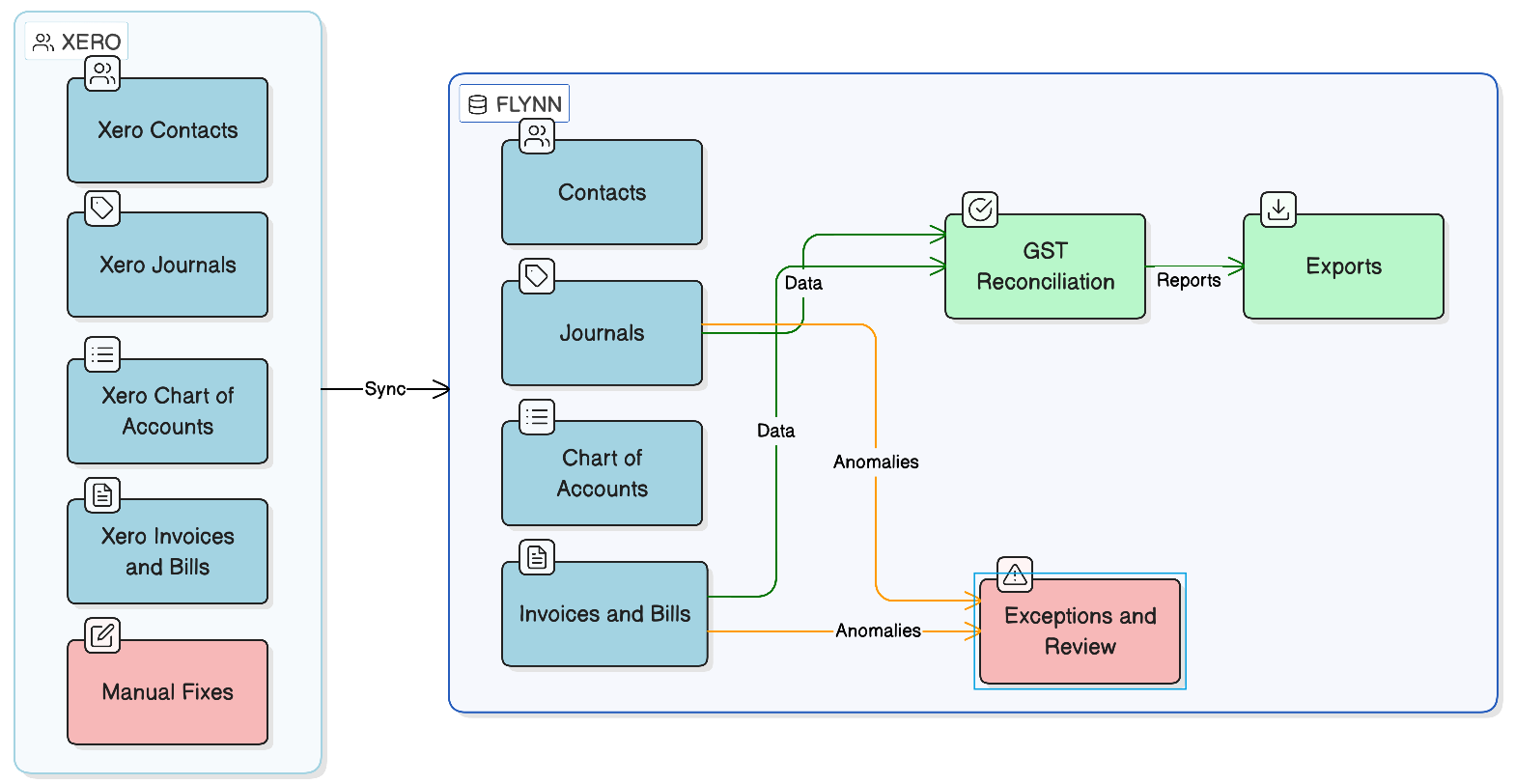
Flynn ↔ Xero Data Flow
Flynn securely connects to Xero to synchronise selected accounting data required for GST reconciliation. Data is processed within Flynn to generate workpapers and reports, and any required corrections are completed in Xero before re-synchronisation.